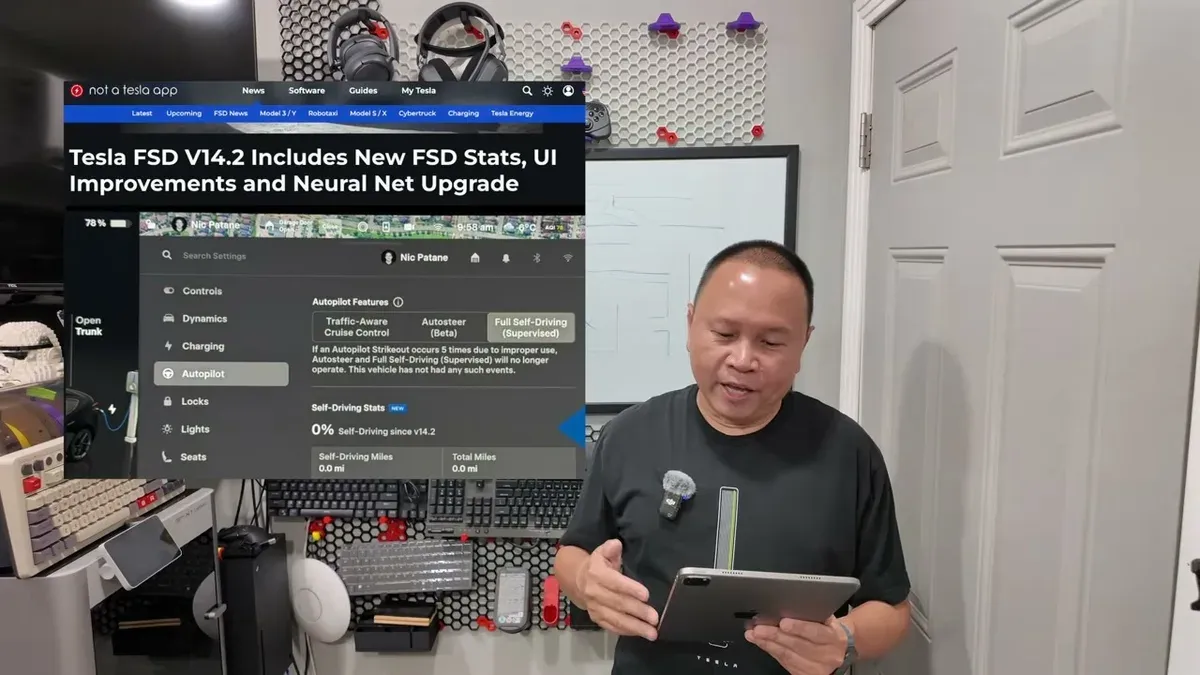
FSD v14.2 added usage tracking, and apparently I’ve been doing it wrong. People are posting 95%, 100%, 8,000 miles with FSD engaged the whole time. I’m sitting at 70% on the Model Y Juniper and 39% on the Cybertruck. The gap had me wondering: am I missing something?
I’m not. Here’s everything that’s taking me off FSD, documented from real SoCal routes before I install 14.3.2.
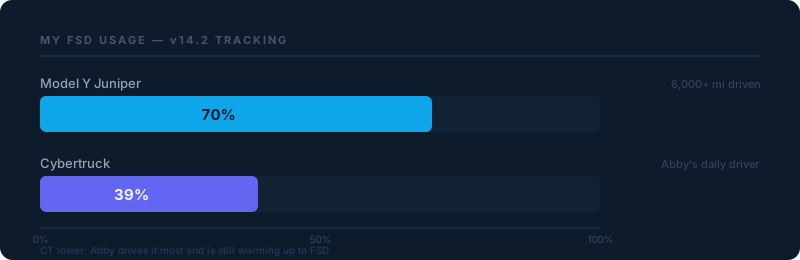
The 39% on the Cybertruck is mostly Abby’s number. She’s been driving it daily and until recently wasn’t touching FSD. More on that below.
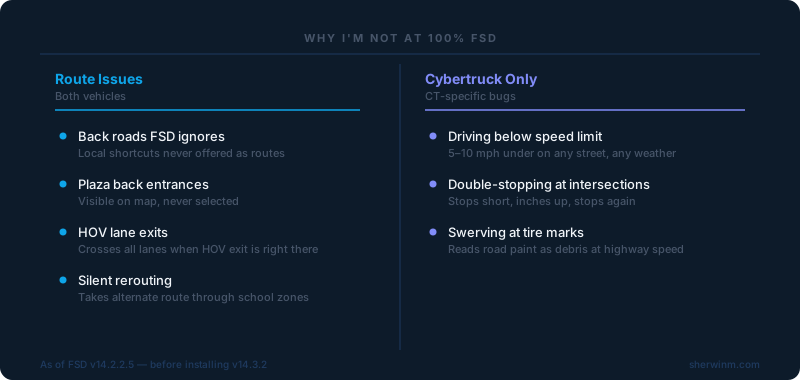
The Routes FSD Won’t Take
Most of my disengagements aren’t about FSD failing. They’re about FSD being stubborn about which roads it’ll use.
I drop my kids at school every morning. There’s a back way that bypasses the bridge overpass where traffic stacks from two highway on/off-ramps. It’s not a secret route. Locals know it. FSD doesn’t. It picks one of two main street options, both of which back up the same way. The rare time it does offer the back way, I let FSD run. The other 98% of the time I disengage and drive it myself.
Same story at plazas. There are shopping centers we go to with a back entrance, visible on the map, never selected by FSD. I drive in manually, it redraws the path and suddenly acts like “oh yeah, this works.” Next visit? Back to ignoring it.
HOV lane exits are the one that consistently frustrates me. In SoCal, some freeway exits branch directly from the HOV lane, no crossing three lanes of traffic required. FSD doesn’t use them. It’ll navigate all the way from the far-left HOV lane to the far-right exit, the exact move the HOV exit is designed to avoid. This isn’t a new thing, and I genuinely don’t understand why the AI can’t learn from repeated disengagements in the same location.
The Rerouting Problem
Under Controls → Navigation → Online Routing, there’s a time-savings threshold for alternate routes. Mine’s at 10 minutes. It does not follow that setting.
FSD will silently switch routes to save as little as 2 minutes, sometimes costing me time. I’m relaxed, not watching the screen because that’s the point of FSD, and suddenly it’s changing lanes across the freeway toward an off-ramp I didn’t choose. I tried accepting one reroute out of curiosity. It ran me through a school zone at drop-off time.
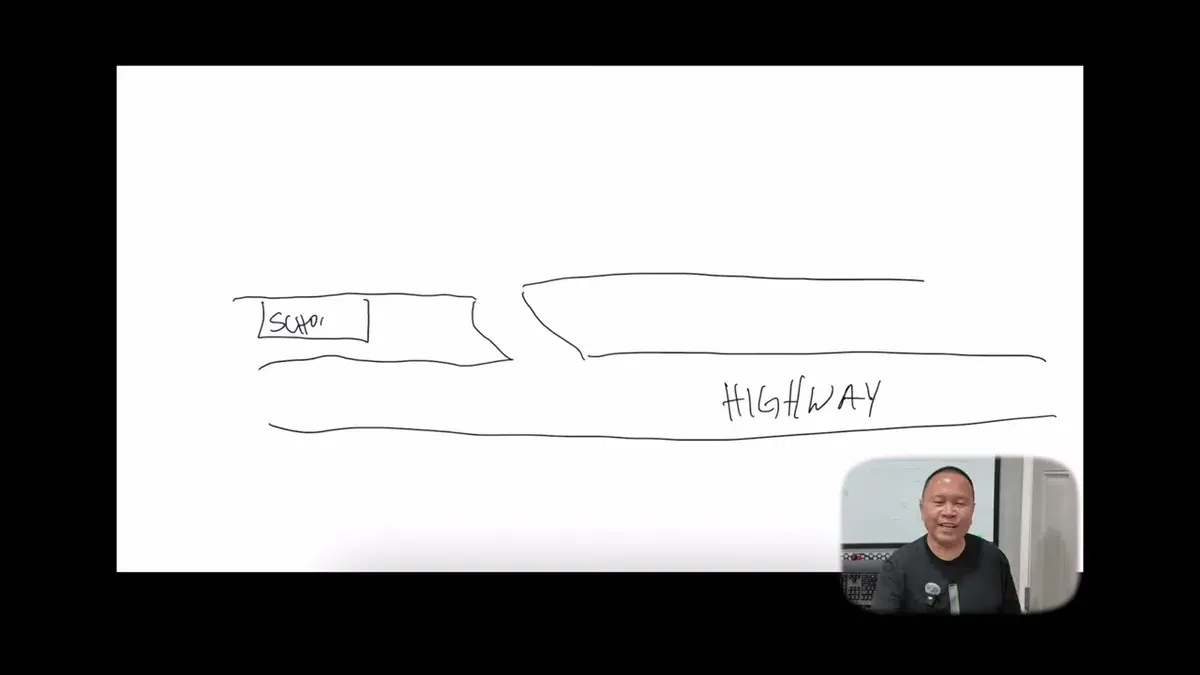
If you’ve never been stuck in a school zone during morning drop-off, I envy you. It’s worse than highway gridlock: people making U-turns, stopping in the lane, ignoring every traffic law. FSD “saving” me 4 minutes by routing through that is not saving anything. I disengaged and stayed on the freeway.
The Rivian handles this better. It shows a confirmation prompt with a countdown. You can reject the reroute before it executes. Tesla’s version is quiet enough that by the time I notice, I’m already two lane changes into a detour I don’t want.
Cybertruck FSD Is a Different Beast
Everything above applies to both vehicles. What follows is Cybertruck only. None of it happens on the Model Y.
Driving below the speed limit: On streets and residential roads, the CT drives 5–10 mph under the posted limit on Standard profile. Not because of weather, not road conditions. It just does it on any street, any time of day. I tap the accelerator to bring it back up, it holds briefly, then drifts down again. Standard mode should drive at the speed limit. That’s what Standard means.
Double-stopping at intersections: At T-intersections, it stops 5–10 feet short of where you’d need to be to actually see cross traffic clearly. Then it inches forward and stops again. If someone’s behind me, they’re not expecting two stops at a stop sign. I’ve started disengaging before right turns to avoid the awkward double-beat.
Swerving at tire marks: FSD reads dark tire marks on asphalt as obstacles and swerves around them at freeway speed. Light swerves are annoying. I’ve had hard swerves that caught me completely off guard. The NHTSA has an open investigation on FSD swerving behavior, and Tesla’s release notes mention “improved offsetting for road debris,” but I’m still seeing it regularly on the CT. The Model Y does it too, but far less often.
Is 70% Worth $99 a Month?
For the Model Y, yes. Over 6,000 miles at 70% usage means FSD is handling the majority of my daily driving. For SoCal highway commuting, it earns its keep.
The Cybertruck is less clear. We have one year of free FSD expiring in June. Abby drives it most, and she’d gone most of that period without touching FSD. But she told me recently she started using it. There are things that happen that still make her hesitate (some of the same bugs above), but she’s coming around. At 39% on her truck, I’m not sure I’d pay full price out of pocket. I have referral points from everyone using my Tesla referral link, so I’ll probably keep it going and see if usage picks up.
For anyone just starting out on FSD, the trial access through my referral is the right way to evaluate it on your own routes before committing to $99/month.
HW3 vs HW4: My Take
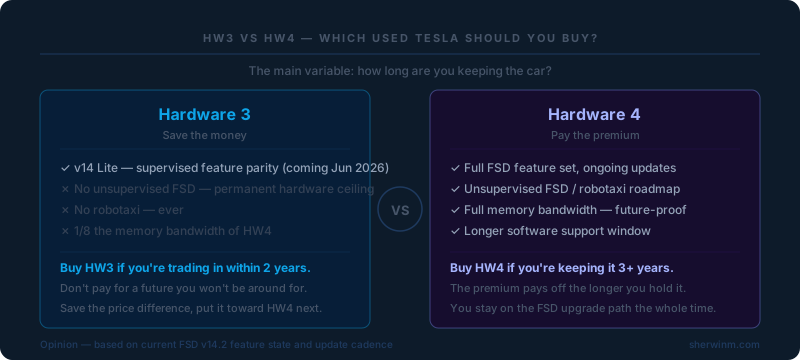
Shout out to David who reached out on Instagram. He has a HW4 Model Y and is looking at a second used Tesla. Wondering if the HW3 savings are worth it.
Tesla’s AI chief confirmed that FSD v14 Lite for HW3 is coming (expected by end of June 2026) and will bring supervised driving feature parity with HW4. So for the stuff you can do today with a human supervising, HW3 should get there. But unsupervised FSD and robotaxi are permanently off the table for HW3. That’s a hardware ceiling, not a roadmap gap: HW3 has 1/8 the memory bandwidth of HW4 and Elon confirmed on the Q1 earnings call it simply can’t do it.
If you’re keeping the car two years or less, HW3 makes sense. Don’t pay for a future you’re not staying for. If you’re holding it 3+ years and using FSD the whole time, HW4 is worth the premium: you stay on the upgrade path and the hardware actually supports where this is heading. I covered more of the Cybertruck’s long-term FSD experience in my 20,000-mile review if you want the full picture before deciding. The NHTSA investigation and v14.2 release notes are linked in the video description.
Help David out in the comments. He’ll be reading.
What FSD quirks are you running into? And if you’re genuinely sitting at 99–100% with real daily driving miles (school runs, errands, SoCal traffic), I actually want to know. Tell me what your routes look like.
I’ve also been comparing FSD to Rivian’s Highway Assist pretty regularly now, and the rerouting behavior difference alone is worth a dedicated post. Drop your thoughts below.
Leave a comment
Comments come straight to me rather than posting publicly, and I read every one. Your email is never published.